‘Sleigh Ride’: An Accidental Classic Christmas Song

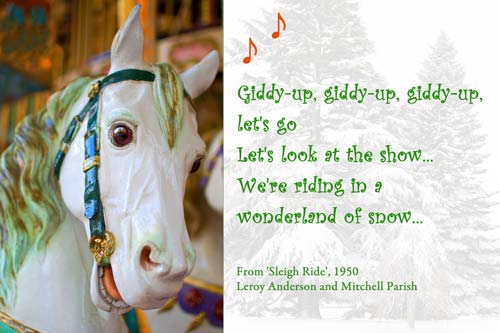
Giddy Up - A Quillcards™ Ecard

Bet You Know This One!
If you live in the West and in a good number of countries otherwise around the world, chances are very high that you’ll recognize this first stanza of the iconic American Christmas song called ‘Sleigh Ride’ composed by Leroy Anderson with lyrics written by Mitchell Parish:

Just hear those sleigh bells jingling,
ring ting tingling too…
Come on, it’s lovely weather
for a sleigh ride together with you.
Outside the snow is falling
and friends are calling “yoo hoo”…
Come on, it’s lovely weather
for a sleigh ride together with you.

We’re Having A Heat Wave
It was actually during a heat wave in July 1946 that Leroy Anderson thought of composing the music for this song.

His idea was to create a light orchestral piece, and it wasn’t until the winter of 1948 that he finished his composition. A year later its first performance took place, played by the Boston Pops Orchestra under the baton of Arthur Fiedler.

‘Sleigh Ride’ Gets Famous
It was the era of 45 rpm and 78 rpm vinyl records, and the song became a hit record for the RCA Victor Red Seal and grew to become the Boston Pops Orchestra’s signature song.

Spicing It Up
A year after the piece was first performed, Mitchell Parish wrote his lyrics for the song, which were about a person wanting to go for a sleigh ride with someone on a winter’s day.

Pass The Pumpkin Pie (And Not The Christmas Turkey)
Although ‘Sleigh Ride’ is generally played most around Christmas and often appears on Christmas compilation albums, the lyrics never specifically mention Christmas or any religious observance.

In fact, the pumpkin pie talked about in the fifth stanza of the song is suggestive of Thanksgiving more than of Christmas.

An Accidental Christmas Classic
Whether or not its composer and lyricist intended it as a Christmas song, “Sleigh Ride” is consistently ranked in the top 10 list of most performed songs during the Christmas season around the world according to the review of Christmas music issued by the American Society of Composers, Authors and Publishers.

How ‘Sleigh Ride’ Ranks in The History of Western Music
And according to the author Steve Metcalf who wrote the book entitled Leroy Anderson: A Bio-Bibliography published by Praeger in 2004, “Sleigh Ride … has been performed and recorded by a wider array of musical artists than any other piece in the history of Western music.”

Now What Was That Line??
Just in case you can’t recall all the lyrics of this wonderfully festive song (including that bit about the pumpkin pie mentioned earlier), here they are:

Just hear those sleigh bells jingling,
ring ting tingling too…
Come on, it’s lovely weather
for a sleigh ride together with you.
Outside the snow is falling
and friends are calling “yoo hoo”…
Come on, it’s lovely weather
for a sleigh ride together with you.

Giddy up, giddy up, giddy up,
let’s go… Let’s look at the show…
We’re riding in a wonderland of snow.
Giddy up, giddy up, giddy up,
it’s grand… Just holding your hand…
We’re gliding along with a song
of a wintry fairy land.

Our cheeks are nice and rosy
and comfy cozy are we…
We’re snuggled up together
like two birds of a feather would be…
Let’s take that road before us
and sing a chorus or two…
Come on, it’s lovely weather
for a sleigh ride together with you.

There’s a birthday party
at the home of Farmer Gray…
It’ll be the perfect ending a of perfect day.
We’ll be singing the songs
we love to sing without a single stop…
At the fireplace while we watch
the chestnuts pop… Pop! pop! pop!

There’s a happy feeling
nothing in the world can buy…
When they pass around the coffee
and the pumpkin pie.
It’ll nearly be like a picture print
by Currier and Ives…
These wonderful things are the things
we remember all through our lives!

Just hear those sleigh bells jingling,
ring ting tingling too…
Come on, it’s lovely weather
for a sleigh ride together with you.
Outside the snow is falling
and friends are calling “yoo hoo”…
Come on, it’s lovely weather
for a sleigh ride together with you.

It’s lovely weather for a sleigh ride together with you…
It’s lovely weather for a sleigh ride together with you.

Sleigh Ride – music by Leroy Anderson, lyrics by Mitchell Parish
Nikon D700 and D60: Image Quality at ISO 1600 Compared

Background
The D700 is a phenomenal camera. It produces completely clean images at ISO 1600 and the dynamic range and color rendering are so pleasing that for the first time since beginning with digital photography, I am unreservedly happy with the camera I am using.

But it is neither small nor light. In comparison, the D60 is both small and light, particularly with the 35mm f1.8 AF-S lens. For a ‘carry anywhere camera’, these are desirable qualities.

If the D60 suffers from any fault compared to the D700 it is the limited dynamic range. But how would it compare purely in terms of image quality at ISO 1600?

Setting Up
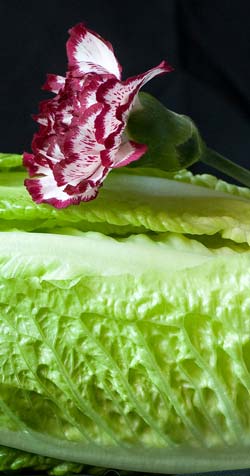
The subjects of this test were a lettuce and a carnation, and they were very cooperative – not making so much as a squeak during the shoot.

Test Subjects ISO 1600

I set them up against a black cotton sheet on the kitchen counter, with the carnation balanced on the lettuce.

The cameras were set one after the other on the counter top to avoid camera shake while I took the shots.

The scene was shot in daylight, illuminated by light from the window, so there was quite a strong light fall-off across the image and strong shadows in the area below the head of the carnation.

The lenses were a 50mm f1.8 lens on the D700 and a 35mm f1.8 lens on the D60 so the field of view was similar for both photographs as noted in this earlier article here comparing image quality under controlled lighting. I shot Aperture Priority with the same settings for both cameras.

And of course I set the ISO to 1600. I have already discovered that the D700 is better at IDO 1600 than my old D200 was even at ISO 100.

The D60, although it is a small entry-level camera, is better in terms of color saturation and noise than the D200. So the question was, how did it compare to the D700 at high ISO?

I processed both shots in Adobe Camera Raw and applied the same sharpening settings to both. The sharpening settings were as follows. Amount: 100, Radius 1.5, Detail 15, Masking 85.

It may be that if I had applied different settings to each of the photographs I could have pulled the ‘optimum’ image out of each of them, but I am not sure it would have made much difference.

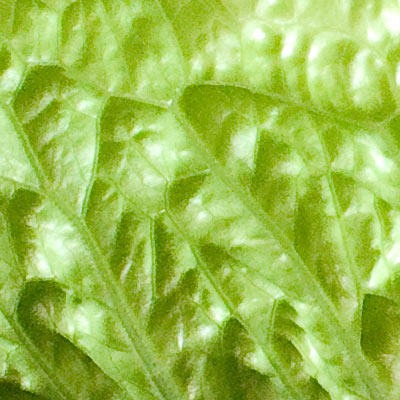
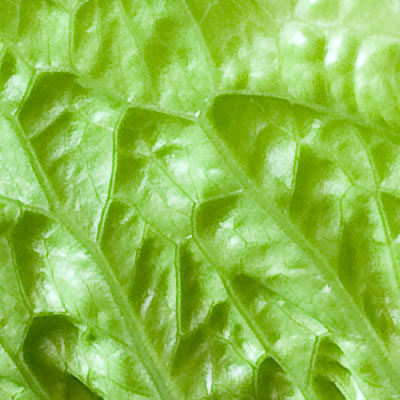
I looked at the two images side by side at 100% on screen and I could easily see that the colors in the photograph from the D700 were noticeably more saturated. The lack of noise in the D700 was obvious as well.

D60
D60

D700
D700

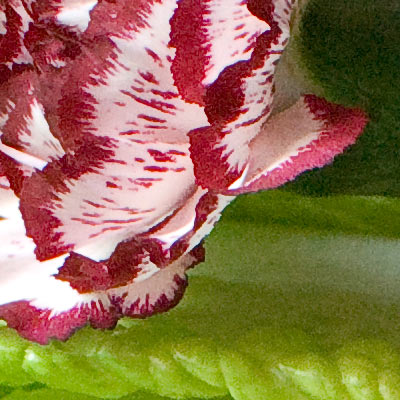
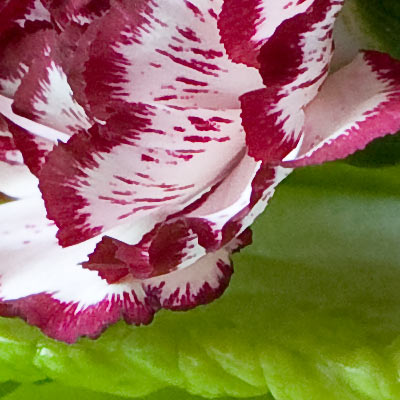
The differences are clear enough on this part of the image.

Shadow Areas
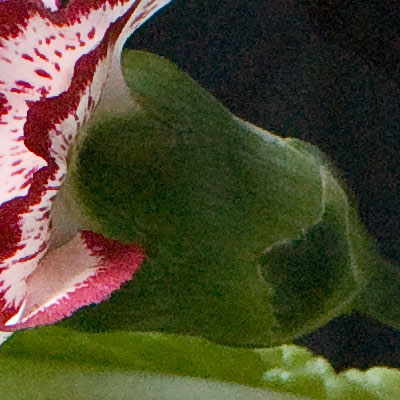
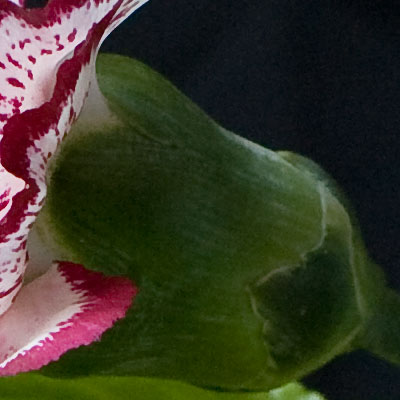
Looking at the sepals and the receptacle (the area below the petals) of the carnation, at first it looked to me as though noise reduction had been applied to the D700 image because it seemed less detailed than the image from the D60.

Depth Of Field
Perhaps there was another reason, however. As I said earlier, I balanced the carnation on the lettuce. I placed the carnation so that it and the lettuce were more or less in the same plane – thus minimizing any depth of field problems. I shot at f7.1 but particularly at this short distance, and bearing in mind that the D700 has a full-frame sensor, the depth of field will not be the same for the two camera-lens combinations.

Using Bob Atkins’ depth of field calculator, I calculated that the depth of field for the D700 was 6cm (2.3 inches) and for the D60 it was 10cm (4 inches).

Therefore this part of the image from the D700 might have looked like there was more noise reduction, whereas it might have been less sharp simply because it was not in focus.

I eventually decided it was that the color was very dense and there was less variation in the D700 image than there was in the D60, where the image was breaking up. What do you think?

D60
D60
D700
D700

What I mean about the image breaking up in the D60 is that there were areas of pixelation – there were even areas where there was more or less nothing recorded.

That doesn’t mean the photograph looked bad. Viewed on screen at lower magnification, it just looked a little washed out compared to the image from the D700.

Perhaps the break up of the detail of the image could be offset to some degree by boosting saturation.

Conclusion
Here below are crops of the another part of the image, where everything is definitely within the zone of sharp focus, and the results are very obvious. Please join in the conversation and let me have your feedback.

D60
D60

D700
D700

We have changed the look of ecard communications.
Connect With Quality – See Our Festive and Seasonal Ecards.

A Photoshop Technique For Darkening Around A Soft Outline

A Herdwick Sheep

Introduction
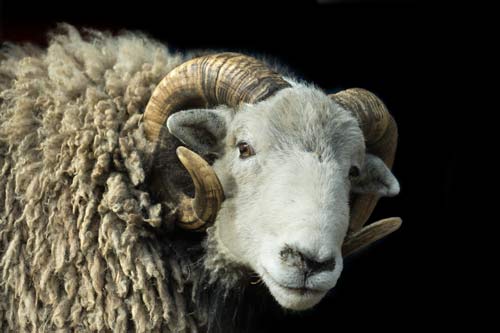
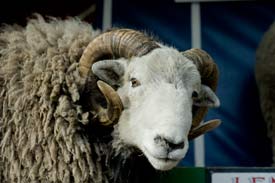
We have just added this photograph of a Herdwick sheep to our range of ecards. The original image had a distracting background and this article explains how I removed it without ‘rubbing out’ the delicate edges of the the fleece.

Love And Economics
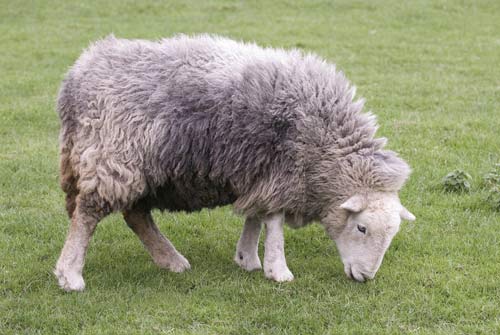
The fleece of the Herdwick sheep is a rich brown color, turning to a lovely grey as the animal grows older, as you can see in the photograph below.

However, if pure economics ruled the sheep world, there would not be any Herdwick sheep.

Compared to some other breeds they do not give birth to as many lambs, they do not put as much weight, and they do not have as soft wool. In fact their wool is so coarse that one of its main uses in recent times has been in home insulation.

A Herdwick Sheep

Herdwicks have survived partly because of the legacy of the author, Beatrix Potter, who bought a farm in the Lake District and raised Herdwick sheep, leaving directions in her will about how the flocks were to be protected after her death.

They are lovely looking animals, and the two shown in the photograph in this article are in the Natural World section of our collection of ecards.

Photographs For Our Ecards
Sometimes you might want to take distracting background elements out of a photograph, as I did with the Herdwick Sheep at the top of this article.

This sheep was standing on an open wagon in the square in the village of Masham during the annual sheep fair. He was starring in a show illustrating the different qualities of various breeds of sheep in England.

As you can see in the original shot below, there were objects of a variety of colors in the background, none of which were very attractive. My intention was to take these out, and the easiest way to do this was to darken down the background in Photoshop. In this photograph I darkened it down to black.

Herdwick

The problem is the same as with any subject that has ‘soft’ edges with lots of stray strands such as this fleece: How does one darken down the background without ‘rubbing out’ parts of the fleece?

I could have stitched carefully around the fleece with the Marquee tool, but it is painstaking work and still doesn’t always work because it can leave a sharp edge that looks unnatural.

More to the point, I prefer quick methods, and what follows here is one I have found that works. It is a two-stage technique.

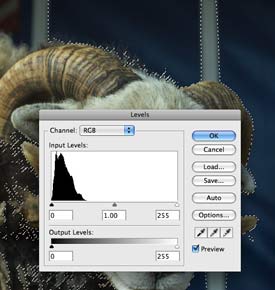
First I use the Magic Wand tool to pick out the area around the fleece. I change the tolerance up or down to suit the subject and just isolate the hairs on the fleece. I ignore parts of the image that are further away from the fleece because I can paint those out later. The important thing is to pick out the area at the edge of the fleece.

Once I have done that, I hide the marching-ants outline because I don’t want the dotted line obstructing my view for the next step. I use a Mac and the command to hide the outline is Command + H. It’s probably Control + H on a PC.

levels-adjustment-1

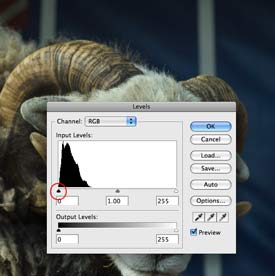
lelvels-adjustment-2

Now that I have a clear view of the edge of the fleece, I use the Levels tool or the Curves tool to darken the image isolated by the Magic Wand tool. I do this by moving the slider (highlighted here with a red circle) to the right. This darkens the part I have isolated.

I stop when I see that the darkening is in danger of erasing the edges of the fleece.

[Just a note here that if I had wanted to lighten the area around the sheep, I would move the right hand slider to the left.]

Now I have an image that is a bit darker near the fleece, so I am part way to what I want to achieve. This first step using the Marquee tool makes it so much easier to use the Brush tool to darken around the fleece, which is the next step.

I use the Brush tool with a large radius – probably several hundred pixels diameter – and with the hardness of the brush set very low to somewhere around 5% and the color set to black.

That means I have a brush that I can use to gently ‘invade’ the area near the fleece and put color into it.

I move the brush tool towards the edge that borders the fleece, changing the diameter of the brush all the time to suit what I am working on.

At some point I clear the area I highlighted with the Marquee tool so that I can brush over any part of the image, and gently fade out the parts that are still left undone.

It’s easy to go back and experiment until the technique flows quickly and the image has been darkened down – with the whole process taking just a minute or so from beginning to end.